Run your music school.
Not your spreadsheets.
LessonLoop is UK music school software: one timetable across teachers, rooms and locations; registers on any phone; termly invoicing with card payments and Direct Debit; payroll and P&L reports; and a parent portal on your own domain. £39 a month, flat — unlimited teachers, unlimited pupils. 30-day free trial, no card.
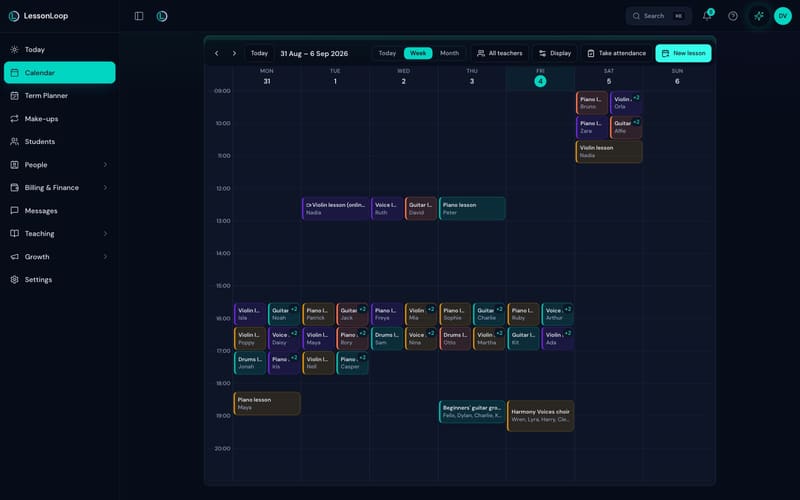
Every teacher, room and site on one grid.
A music school’s hardest hour is a Saturday morning: six teachers, three rooms, group lessons and a choir, and one person holding it together in a spreadsheet. This is that hour, in one view.
The timetable a whole staff can share.
Teacher lanes across the week, so you can see who is free, what is doubled up and where the room has been booked twice — before a parent finds out for you.
- ✓ Week, day and month views across every location, filtered to one teacher or all of them
- ✓ Clash checks on teacher, room and pupil, applied as you book rather than after
- ✓ Group lessons, ensembles and choirs alongside one-to-one teaching, billed per pupil
- ✓ Recurrence beyond weekly, substitutes without rebuilding the term, and online lessons with their own link
- ✓ Teaching availability and time off respected automatically, so nothing lands in a gap that is not really there
The full walkthrough of every screen is on the product tour’s scheduling section.
Attendance taken in the corridor.
One tap per pupil on a phone between lessons. The same mark feeds the invoice, the make-up credit and the teacher’s pay — so a register taken properly is the last time anybody touches that lesson.
- ✓ Present, absent, late or cancelled, each saving on its own — there is no separate save step to forget
- ✓ Absence reasons that carry your rules: whether a credit is earned, whether the slot is released, and a per-term cap
- ✓ School registers for lessons with no fixed clock time — grouped per site, per teacher, per day, in the order the children actually arrive
- ✓ An unconfirmed queue on the Today screen, so a term is never invoiced from a lesson nobody marked
Make-up credits, closures and the absence rules are covered in how make-up credits work.
Terms, half terms and closures — set once, obeyed everywhere.
A UK school year is not twelve equal months, and software that pretends otherwise puts the difference back on your desk every September. Terms here are real objects that lessons, invoices and registers all follow.
Term dates and closures
Set the term, add half term and the bank holidays, and every teacher’s timetable moves with it. A closure applies across the whole school at once, and the families affected can be told in the same pass.
Rolling a term forward
The Term Planner takes next term’s dates and rebuilds the timetable — same child, same slot, same teacher — in one review pass, with anyone leaving unticked before it runs. It is the September evening that used to cost a weekend.
Asking families first
Term continuation asks every family whether they are carrying on, chases the ones who have not answered, and hands you a list of confirmed places before you commit a teacher to a slot for another twelve weeks.
Not sure how many weeks you are actually billing? The free term planner works out your real teaching year, and how many teaching weeks are in a UK school year gives the 2026/27 dates by nation.
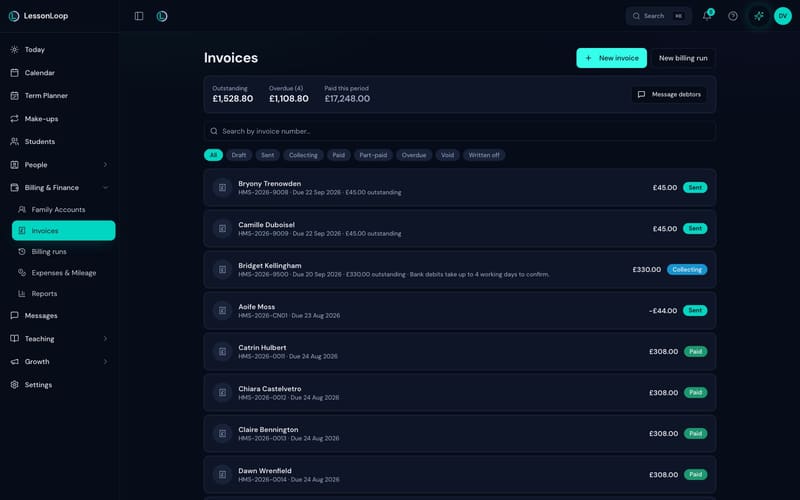
A term’s invoicing in one run.
Fees come from the lessons that are genuinely on the timetable and genuinely marked, not from a list somebody retyped in the holidays. One run, one preview, one set of invoices — then the chasing looks after itself.
Preview it before it exists.
A billing run gathers every completed lesson since the last one, shows you exactly what it is about to produce, and only then creates the invoices. Nothing is sent by surprise.
- ✓ Rate cards by instrument, subject, lesson length, teacher or pupil, so the price is right without being typed
- ✓ Termly, half-termly, monthly or per lesson — whichever your parents already understand
- ✓ Eight invoice statuses that mean something: draft, sent, collecting, paid, part-paid, overdue, void, written off
- ✓ VAT-aware invoicing, sent from your own email address on your own domain
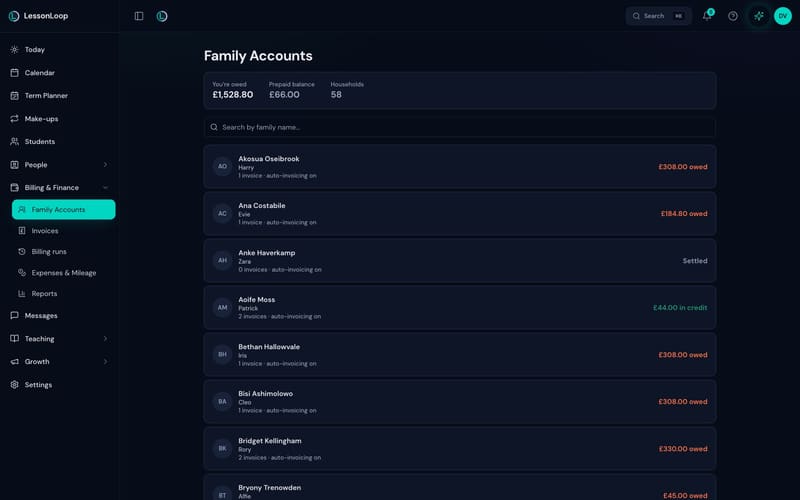
One household, one balance.
Three siblings on four instruments still make one family account, one statement and one conversation — with prepaid credit, part payments and refunds all landing where they belong.
- ✓ Card payments and Bacs Direct Debit into your own Stripe account — the money is yours the moment it clears
- ✓ Parents set the Direct Debit mandate up themselves in the portal, because a mandate is the payer’s authority to give
- ✓ Payment plans and instalments across a term, collected as each date arrives
- ✓ Automatic late fees with a grace period and a cap, and a reminder ladder that leaves a family alone while a collection is in flight
- ✓ A one-way sync of invoices and payments into Xero, so your accountant sees reconciled data without an export
How the Bacs rail behaves, end to end, is in Direct Debit for music lesson fees.
Payroll that traces back
to a real lesson.
Thirteen reports, all built from lessons that actually happened — so what you pay a teacher, what a term made and how full the rooms were reconcile to the same register.
Teachers and roles
Unlimited teacher accounts on the School plan. Pay rates per lesson, hourly or as a percentage, set per teacher and per instrument. Substitutes are attributed to whoever actually taught. Four roles decide what each person can open, so a teacher never sees another teacher’s rate or a family’s balance.
The thirteen reports
Revenue, outstanding, payroll, P&L, event profit, billable hours, expenses, mileage, lessons delivered, cancellations, utilisation, attendance and teacher performance — by week, month, term or a custom range, each one a click from a CSV.
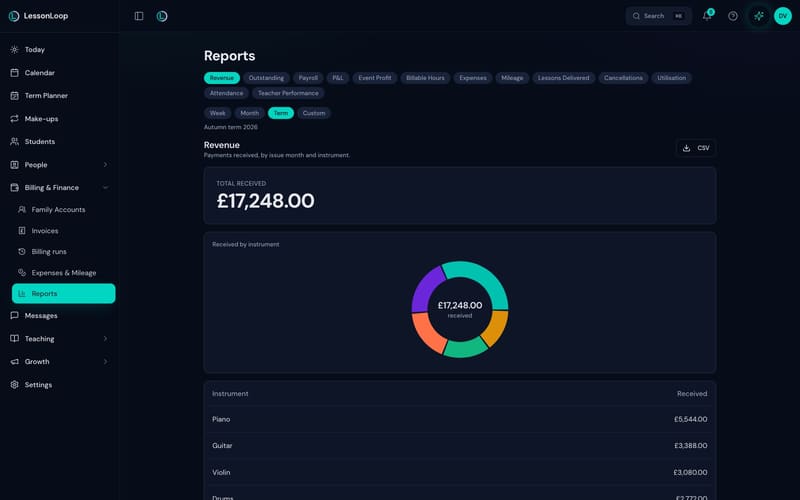
Expenses and mileage run on the UK tax year at HMRC rates. Everything above is on both plans — the full plan comparison lists every line.
A portal with your school’s name on it.
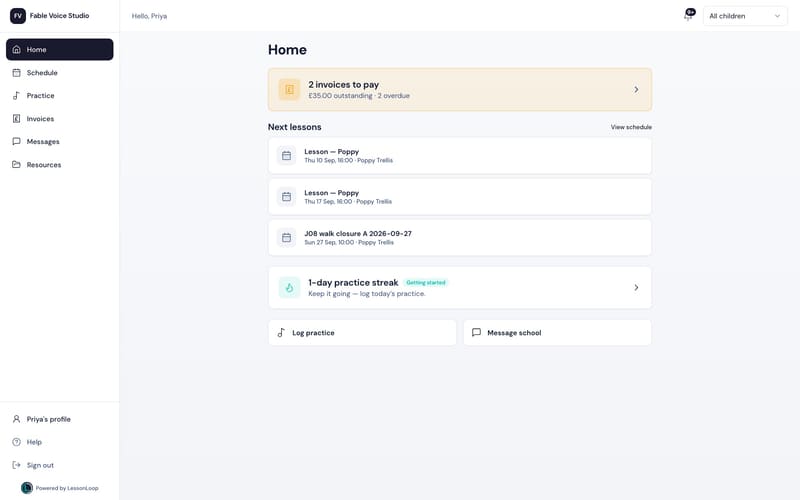
Schedules, invoices, messages and practice in one login, at your own address rather than ours — so the thing you ask two hundred families to use looks like your school, not like a supplier.
- ✓ White-label portal on your own custom domain, with your name and colours
- ✓ This term’s schedule, every invoice, card payment and a Direct Debit families manage themselves
- ✓ Practice streaks, weekly goals and badges that give a child a reason to open it between lessons
- ✓ Email from your own address with per-family delivery status and consent recorded; WhatsApp reminders are an optional prepaid pack, currently in early access. There is no SMS channel
- ✓ Public booking pages and an embeddable enquiry widget for your own website
- ✓ Families review their teachers after eight lessons — you approve every one, and the ones you feature go on your booking page
The only AI that does the admin.
Not a chatbot bolted to a help centre. Ask in plain English and it proposes the actual change — the invoice drafted, the lesson moved, the balance chased — then waits for you to confirm before anything happens.
Propose, confirm, execute
Every action is shown to you first, in the words of the change it will make. Nothing runs on your school without a person saying yes, and everything it does is written to the audit log.
The Morning Brief
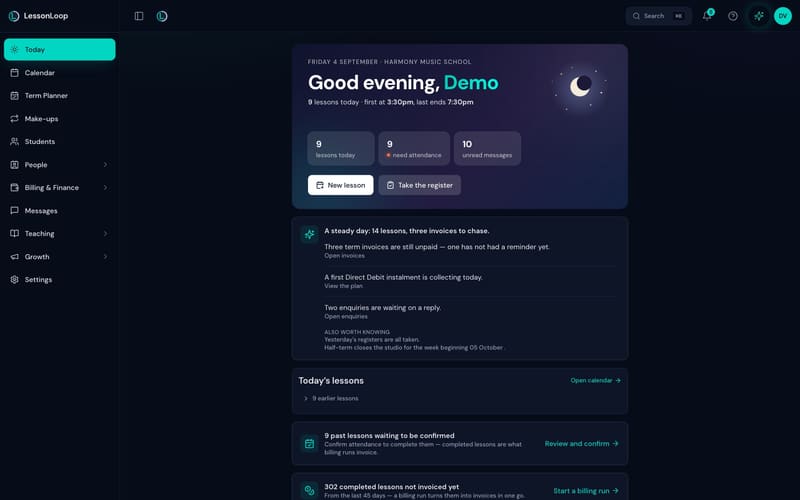
What needs you today, at the top of the Today screen: the invoices still unpaid, the instalment collecting, the enquiries waiting, the registers nobody took, and the closure that lands next month.
Your school from ChatGPT or Claude
The MCP connector answers questions about your own school inside the assistant you already use. It is read-only today — it reads, it does not change anything. LoopAssist is on both plans; School carries double the daily actions.
What connects to what — Stripe, Xero, Google Calendar, WhatsApp and the connector — is set out on the integrations page.
Hire your tenth teacher. The price does not move.
Published list prices, read from each vendor’s own pricing page. A music school is exactly where a per-teacher meter bites, because growth is hiring.
| Team size | MyMusicStaff | MakeMusic Studio | My Music Lessons | LessonLoop |
|---|---|---|---|---|
| 1 teacher | ~£13 | ~£16 | £9.95 | £15 Solo |
| 5 teachers | ~£29 | ~£31 | £21.75 | £39 |
| 8 teachers | ~£40 | ~£43 | £30.60 | £39 |
| 15 teachers | ~£67 | ~£70 | £51.25 | £39 |
| 30 teachers | ~£125 | ~£128 | £95.50 | £39 |
Every price above was read from that vendor’s own pricing page on 4 September 2026. US list prices converted at approximately $1 = £0.78 for comparison only — the rate moves, and what a UK card is charged depends on the vendor’s own checkout. GBP prices are as published. LessonLoop is £15 a month Solo — one teacher, unlimited pupils — and £39 a month School, with unlimited teacher accounts and unlimited pupils. The School price is the same at three teachers or thirty. Run it on your own numbers, or read the full comparison tables.
Bring last term with you.
Guided migration is free on every plan, and not one family is emailed while an import is running. Most schools are running within a day.
Export
Pull your pupils, guardians and timetable out of whatever you use now. A spreadsheet is fine — most schools send one.
We import
Send it over and we map and load it for you, free, on every plan, then check it with you before anything is live.
You invite
You choose the moment families are invited to the portal — usually the start of a term, when the timetable is already right.
Switching cost is the reason most schools stay somewhere they have outgrown, so we removed it. The step-by-step version is bringing your school in.
Everything on this page is checkable.
No stock photography, no invented testimonials and no numbers without a source. Here is where each claim comes from.
LessonLoop was built inside a working music school with a 23-year teaching history, and that school runs on it every teaching day. Every release lands there before it lands anywhere else.
Read the story behind it → See it before you sign up A live demo, with no signupA seeded school you can click through right now — a term of lessons, real invoices, a parent portal. No email address, no card, no sales call, no calendar link.
Open the live demo → Real screens Every screenshot is the productEach image on this site is captured from the September build of the app, at the size it renders. Nothing here is an illustration, a mock-up or a concept.
Walk the product, screen by screen → Competitor claims Dated tables, sourced to the vendorEvery price we quote for another product was read from that vendor’s own live pricing page, carries the date it was read, and invites a correction if it has moved.
Read the comparison tables →Support is UK-based and answers within one UK working day. Migration is guided and free on every plan, there is no lock-in and no exit fee, and your data exports in full whenever you ask for it — the pricing page spells out exactly what each plan includes.
Before you click away.
How long does it take to get a whole school running?
Do you really mean unlimited teachers?
What does the 30-day trial include?
Does it work with our accountant?
Is our data safe, and can we get it out?
What happens to our data if we leave?
Can teachers see only their own pupils?
Do you support more than one venue?
The neighbouring pages.
Multi-site music academies
Several venues, visiting teachers and registers with no fixed clock time — with payroll counted from the lessons actually taught.
Read it →Software for a solo music teacher
The £15 version of this page: your diary, registers, automatic invoicing and a parent portal, with unlimited pupils.
Read it →Performing arts school software
The same spine for speech and drama, musical theatre and singing — classes and one-to-one lessons on one timetable.
Read it →Every audience page sits under who LessonLoop is for. The numbers are on pricing, the depth is on the product tour, and the dated competitor tables are on compare.
See it on your own school.
30-day free trial. No card. Bring last term’s timetable — we will import it for you, free.